AI Case Study
You just got a 78-page RFP.
Deadline: 48 hours
Monday, 9:42 AM
You open the document.
Scroll… Scroll… Scroll…
Half the answers already exist somewhere inside your company. You just don’t know where.
❌ Today
- Days of writing
- Endless copy-paste
- Constant expert follow-ups
✅ With AI Agent
- Draft in minutes
- Auto-filled responses
- Ready for review
0
Time Reduction
3x
Faster Drafting
↓
Expert Dependency
RFPs aren’t a writing problem
They’re a knowledge retrieval problem
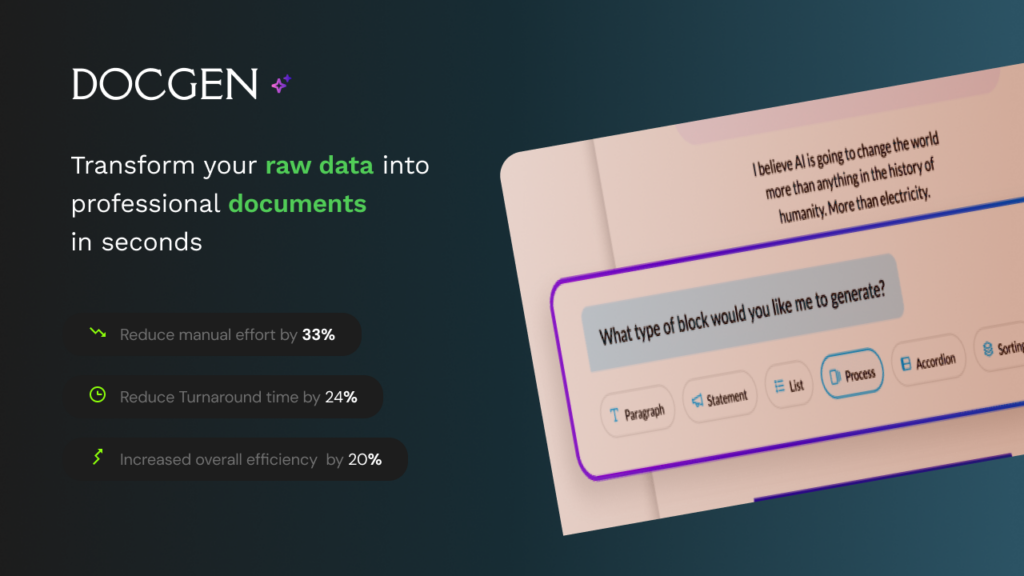
The Problem
Teams weren’t creating new answers—they were searching, copying, and rewriting existing ones. This made proposal creation slow, repetitive, and heavily dependent on domain experts.
Time Intensive
4–6 hours per proposal
Knowledge Dependency
Experts repeatedly involved
Compliance Gaps
Risk of rejection, rework
Inconsistency
No standardized responses
Slow Proposal Cycle
Slow, error‑prone,and hard to scale
Manual copy paste
Manual copy paste, outdated documents
Why Full automation was not acceptable
Fully automated document generation posed significant risks creating legal, compliance, and trust issues.
We intentionally avoided a ‘one-click generate’ experience. Instead, we designed AI as a drafting assistant, keeping users responsible for review and final approval
A typical RFP day
9:00 AM RFP received
10:30 AM Searching past responses
1:00 PM Waiting for expert input
4:00 PM Still drafting
Next day Reviewing & fixing inconsistencies
Where time was spent
Solution
Designed an AI-powered agent that retrieves internal knowledge and generates structured, context-aware RFP responses, significantly reducing manual effort.
What if this was all it took?
🗎 Upload RFP
⚙️ AI parses + retrieves knowledge
✨ Draft generated in minutes
Workflow Transformation
Before
Sales → Expert → Draft → Review → Submit
After
Sales → AI Agent → Review → Submit
Designing for AI Constraints
Building AI-driven products requires balancing automation with user trust, accuracy, and control.
Handling Hallucinations
Designed structured input and knowledge retrieval to minimize incorrect or fabricated responses.
Accuracy FirstTrust & Transparency
Clearly indicated AI-generated content and allowed users to understand source context.
User TrustUser Control
Enabled users to edit, refine, and override AI outputs to ensure reliability in critical workflows.
Human in LoopEditable Flows
Designed flexible workflows where users can review, modify, and finalize responses before submission.
FlexibilityKey Design Decisions
Transparency
Users can see and edit AI-generated responses
Control
Manual override for critical responses
Accuracy
Structured inputs reduce hallucinations
Final Design
Intro Page
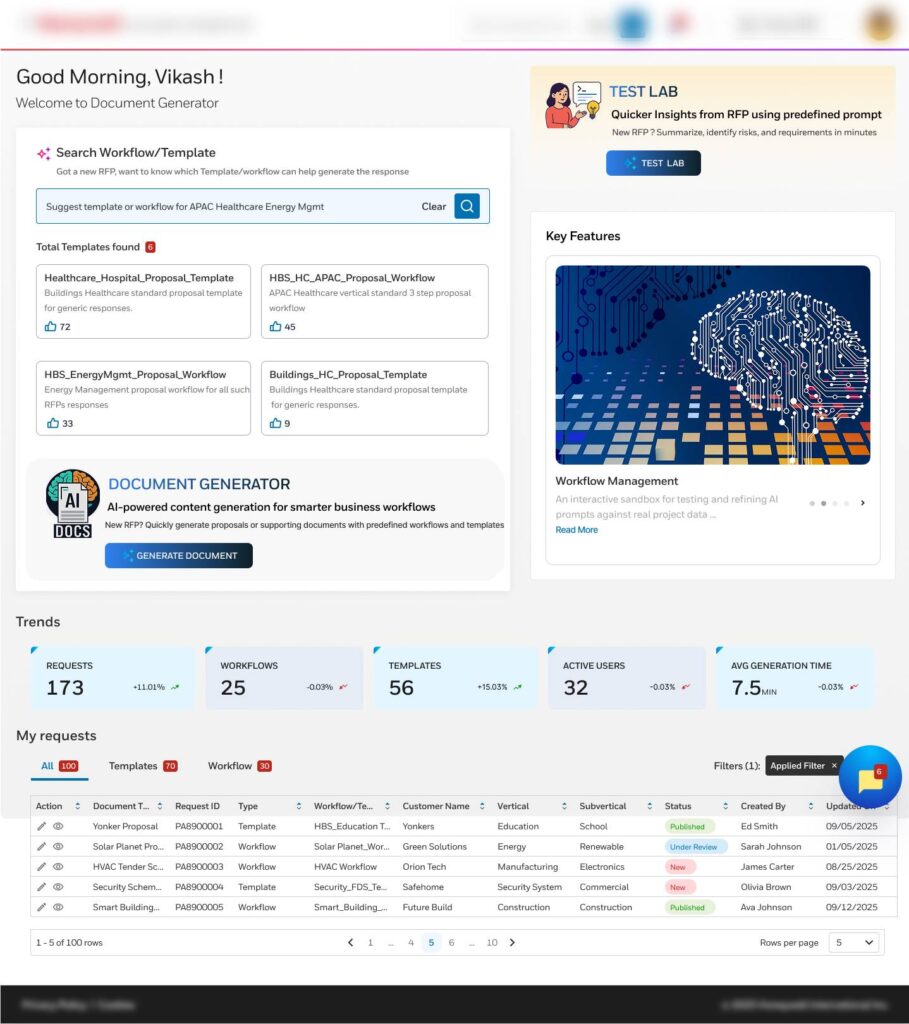
AI-Powered Document Generation
Generate structured documents automatically using AI-driven prompts and templates.
Search Workflow and Templates
Configure and manage reusable search workflows and document templates.
RFP Search Using Predefined Prompts
Quickly find relevant RFPs using standardized, ready-to-use AI prompts.
Test Lab / Prompt Engineering
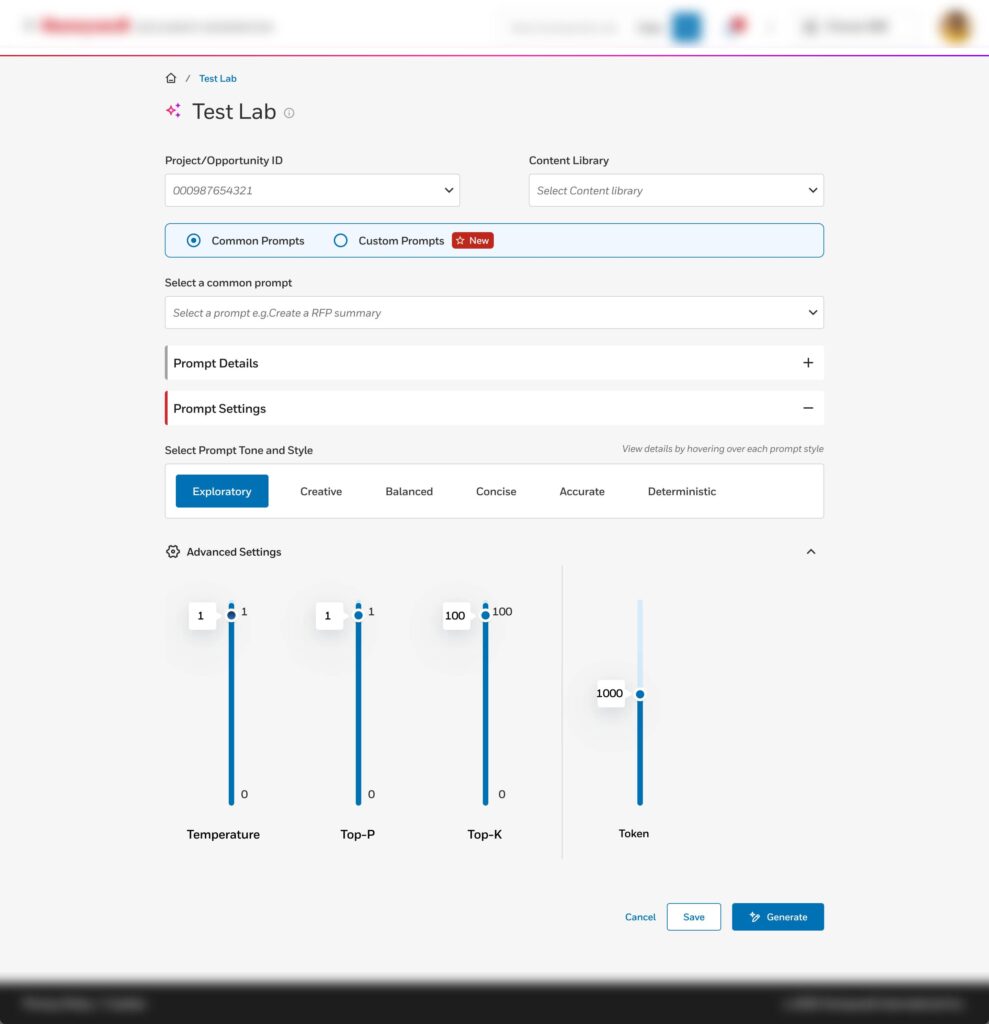
Create Predefined Prompts
Design reusable prompts to ensure consistent and efficient content generation.
Prompt Details & Configuration
Define prompt behavior, scope, and parameters for accurate AI outputs.
Advanced Prompt Configuration
Fine-tune AI responses using advanced rules and control settings.
Template Management
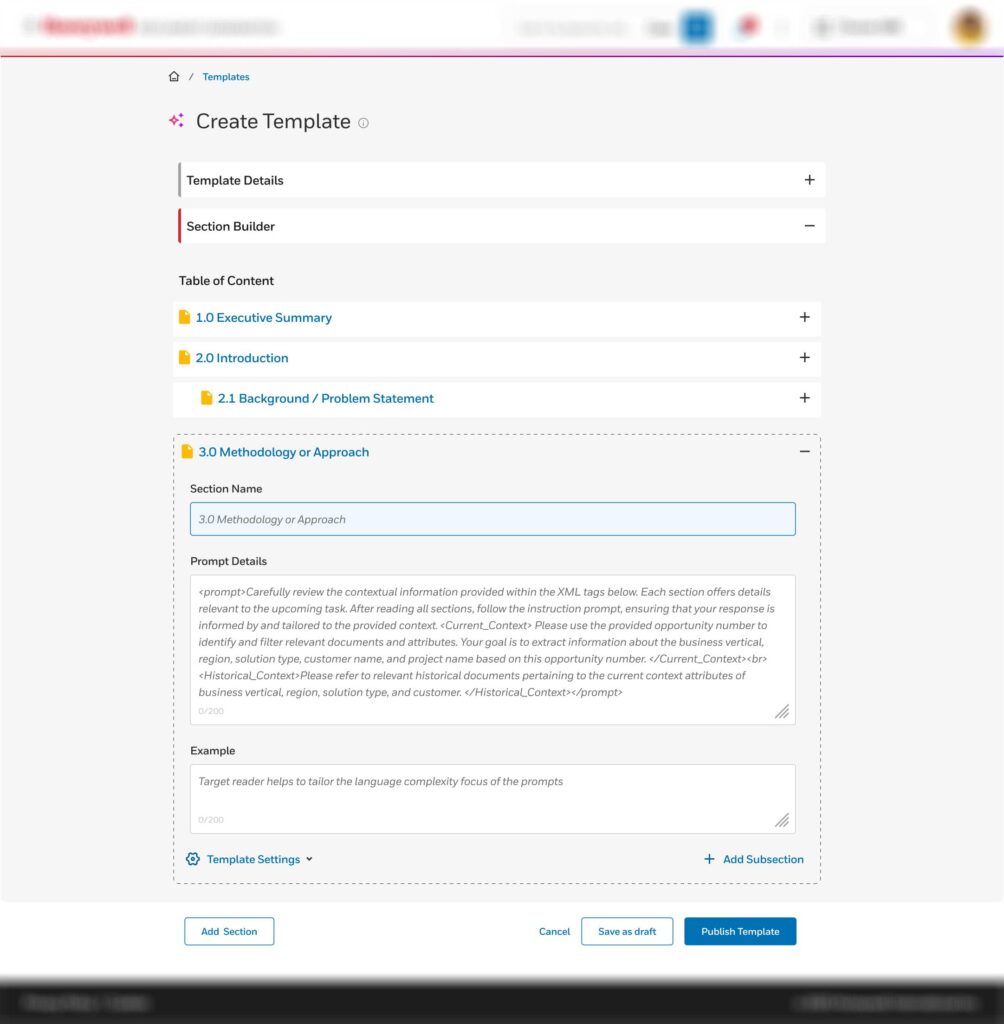
Template Creation
Build structured templates to standardize document generation
Template Details Setup
Configure metadata, naming, and ownership details for templates
Add Sections to Template
Dynamically create and customize sections within a template
Generate Content
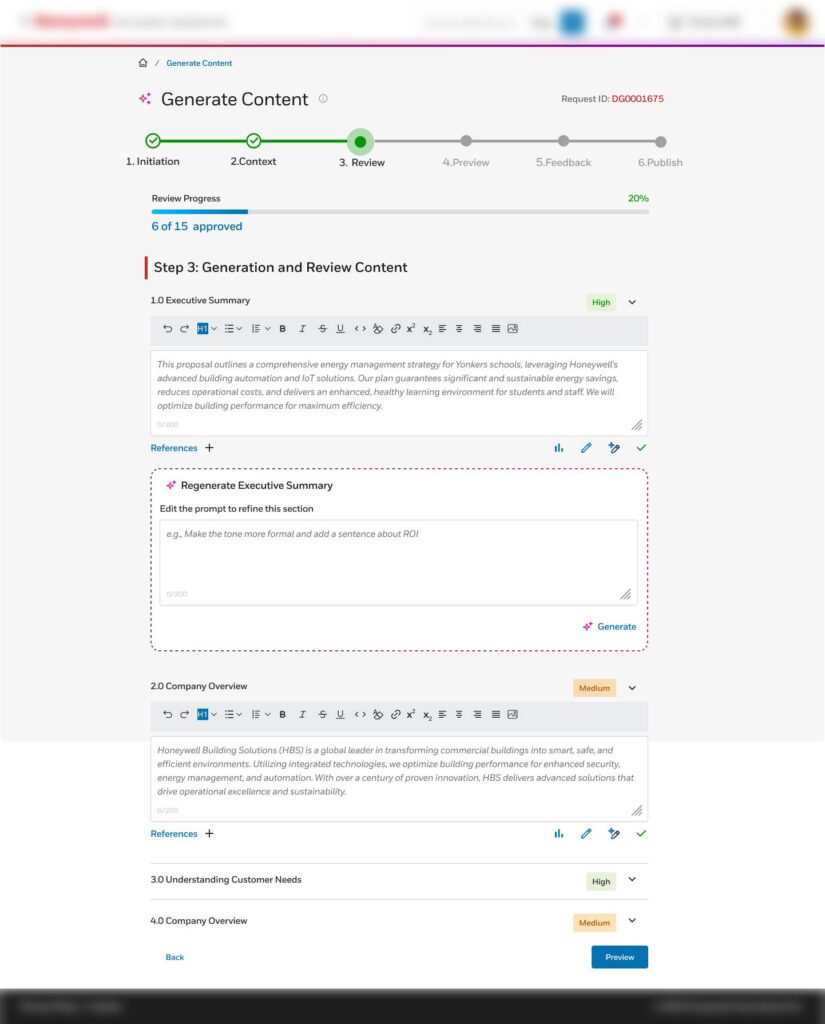
Template Configuration & Rules
Control template behavior, permissions, and generation logic
AI Content Generation
Generate high-quality content automatically using AI models
Confidence Score Assignment
Assign AI-generated confidence levels to validate output reliability
Final Design
Teams struggled to verify and refine generated content efficiently.
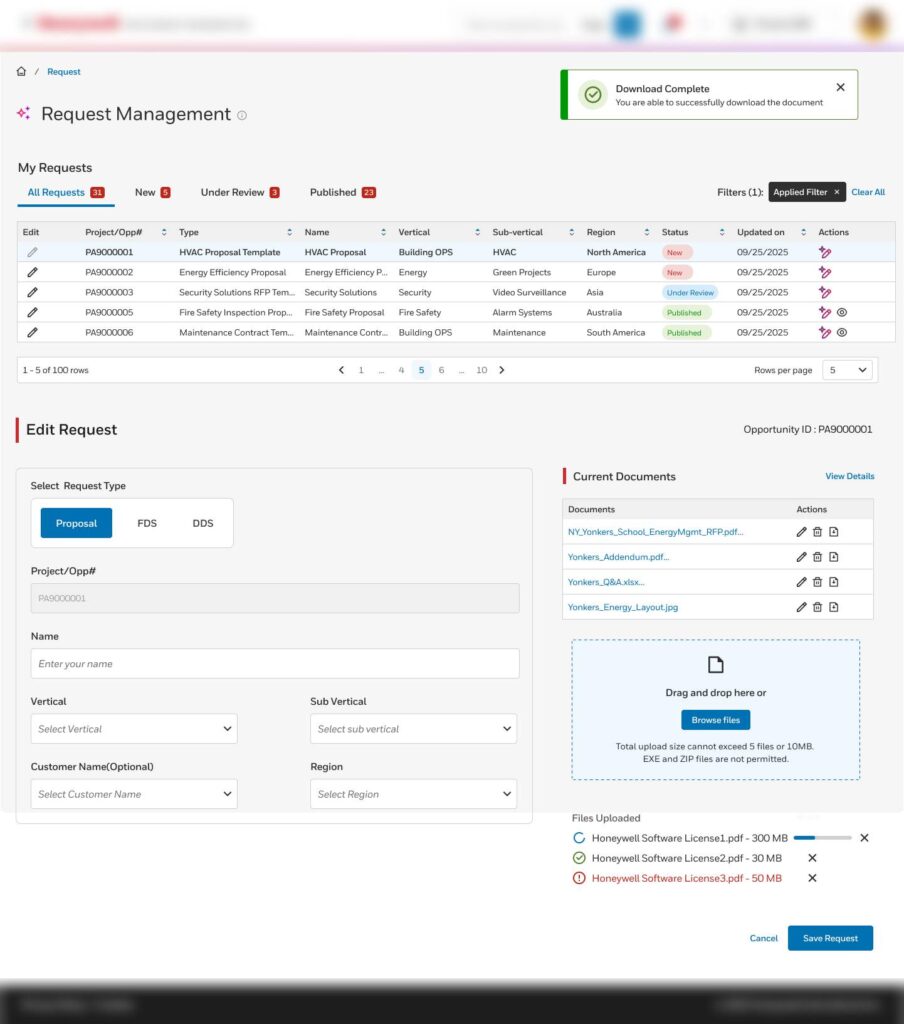
Design SolutionIntroduced a centralized review workspace with editable AI responses, request visibility, and source-linked validation.
✍ Rich Text Editing
Enabled teams to refine AI-generated responses before export.
📊 Request Visibility
Centralized tracking reduced workflow confusion and duplication.
📁 File Repository
Consolidated uploaded documents into a single accessible workspace.
Core UX Principle
Keep AI editable, explainable, and visible inside the workflow.
Impact
🙍♂️ User Testing Participants
- 6 Business Analysts
- 5 Administrative Staff
- 4 Software Developers
📝 Tasks to complete using AI
- Generate a professional invoice from a template
- Customize a report using the document builder
- Export documents in PDF, DOCX, and Markdown formats
- Use AI-assisted content generation to populate sections
- Reduced dependency on subject matter experts by 40%
📶 Statistics to analyze AI
- Success rate
- User satisfaction
- Average generation time
- Ease of use (SUS score)
🎢 Quick Insights
- Document export is fast and reliable
- Love the AI suggestions—it saves time
- AI sometimes adds irrelevant content
- Reduced proposal drafting time by ~60%
Key Learnings
- AI UX requires balancing automation with trust
- Structured knowledge is critical for accuracy
- User control is essential in AI-driven workflows
Leave a Reply