|

Enterprise Platform
Legal Operations
Workflow Simplification

LEGAL WORKFLOW DESIGN

Helping teams review contracts faster and find information easily

Legal teams spent hours checking documents, finding clauses, and making sure everything followed the rules.

The goal was to create a simple and reliable workflow that helps teams work faster, stay organized, and make better decisions.

↓ 60%

Less time spent on manual review

3x

Faster finding of important information

Team + Tools

Workflows built on trust and human review

Legal Assistant

Find contract clauses related to liability limits
3 similar clauses found from past agreements. Risk level: Medium.
Suggested clause includes notes and references for easy understanding.

CORE CHALLENGES

Why legal work becomes slow and difficult at scale

MOST IMPORTANT

Too much time is spent checking contracts by hand

Teams had to look through many documents again and again, trying to find the right information, which made decisions slow.

🎯

Accuracy & Consistency

Different people understood the same document in different ways, which caused confusion.

⚠️

Finding Risks

It was hard to find important risks and problems in long and complex documents.

💸

Slow Work & Higher Costs

Taking more time to review means spending more money and delaying responses.

🧩

Scattered Information

Documents were stored in different places, making them hard to find and use.

BUSINESS IMPACT

It became harder to keep everything organized and follow the same process as work increased.

6+

connected challenges in the workflow

Research Insights

The problem wasn’t creating legal content. It was being confident in it.

Research showed that lawyers cared more about clarity, knowing where information comes from, and feeling confident before sharing their work.

Key Findings · User Research

24 Interviews

Drafting Time

38–45%

A large part of the week was spent writing and revising contracts.

Review Workload

70%

Most people found contract review repetitive and time-consuming.

Negotiation Challenges

61%

It was hard to track changes and keep up with non‑standard edits.

Error Risk

43%

Important issues were sometimes missed due to tiredness and time pressure.

Competitive Overview

Market Scan

Harvey

Low Trust

Fast drafting and summaries, but users were unsure about reliability.

Spellbook

Complex UX

Helps create clauses quickly but can feel complicated to use.

Luminance

Fragmented

Powerful features, but information is spread out and harder to follow.

Key Insight

Users preferred guided workflows with human review over fully automatic processes.

20–40% time savings expected

Most of the value came from making drafting and review faster, while still letting people make the final decisions.

Who Uses This

Built for legal teams handling a lot of work under pressure

⚖️ Lawyers

Review contracts faster and spend less time doing the same work again and again.

🏢 In-House Teams

Manage approvals, follow rules, and handle negotiations more smoothly.

📄 Contract Managers

Keep track of changes and make sure documents follow a clear structure.

🚀 Startups & SMBs

Handle legal work more easily without needing a larger team.

Design Challenges

Building trust in legal workflows

Legal teams need clear, accurate, and reliable work—not just speed.

Clear and Understandable Outputs

Lawyers need results that are easy to understand, with clear sources and explanations.

Trust

Saving Time in Review

Long contracts made work slow, so important points needed to stand out clearly.

Speed

Managing Complex Information

Contracts are complicated, so they needed to be simplified without losing important details.

Accuracy

Easy Team Collaboration

Teams needed to review, edit, and approve work easily while staying in control.

Workflow
UX Architecture

System highlights key points. Lawyers make the final decisions.

Mental Model

Spend less time searching, more time deciding

The system helps by pointing out important parts of contracts, so lawyers can focus on reviewing and making decisions.

Clarity

Every suggestion clearly explains why

Suggestions come with clear reasons and references, so users understand what they are seeing and can trust it.

User Control

Users stay in control

Users can accept, edit, or reject suggestions, making sure they have full control over the final output.

Review Confidence

Clause Risk Review

Medium Confidence

Possible Risk

Liability clause may be unclear or open to different meanings.

Similar cases in the past needed careful review because responsibility was not clearly defined.

Turning legal complexity into clear, actionable insights

Wireframe Strategy & Iteration

Designing intelligent workflows for faster, smarter contract review

Pain Point

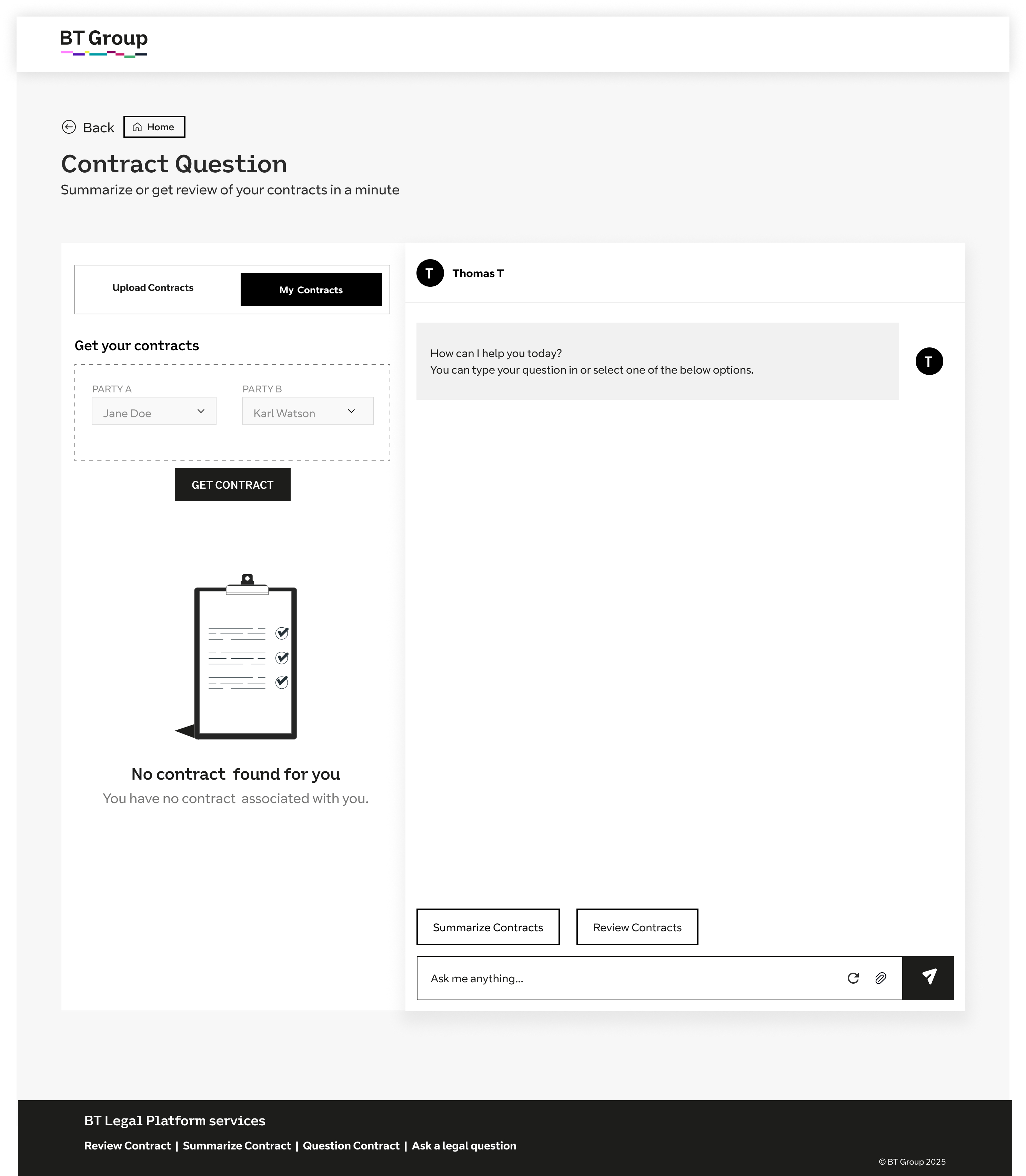
Upload original contract, select playbook and analyse contract →

Design Solution
Guided upload with instant AI analysis and smart playbook selection.
Guided Upload & Playbook Mapping

Generate structured documents automatically using AI-driven prompts and templates.

AI-driven Clause Analysis

Configure and manage reusable search workflows and document templates.
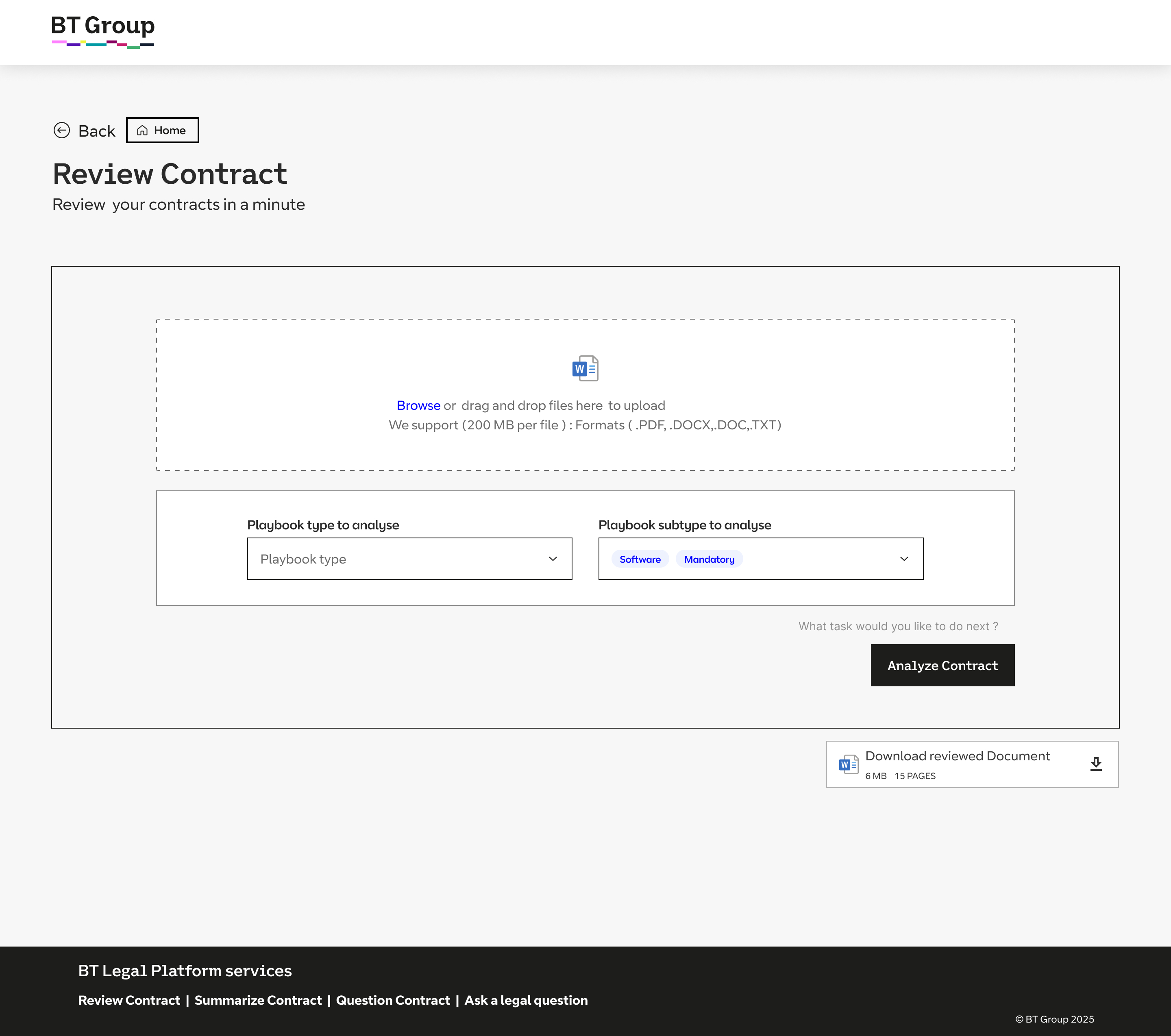
Core UX Principle

Reduce Friction
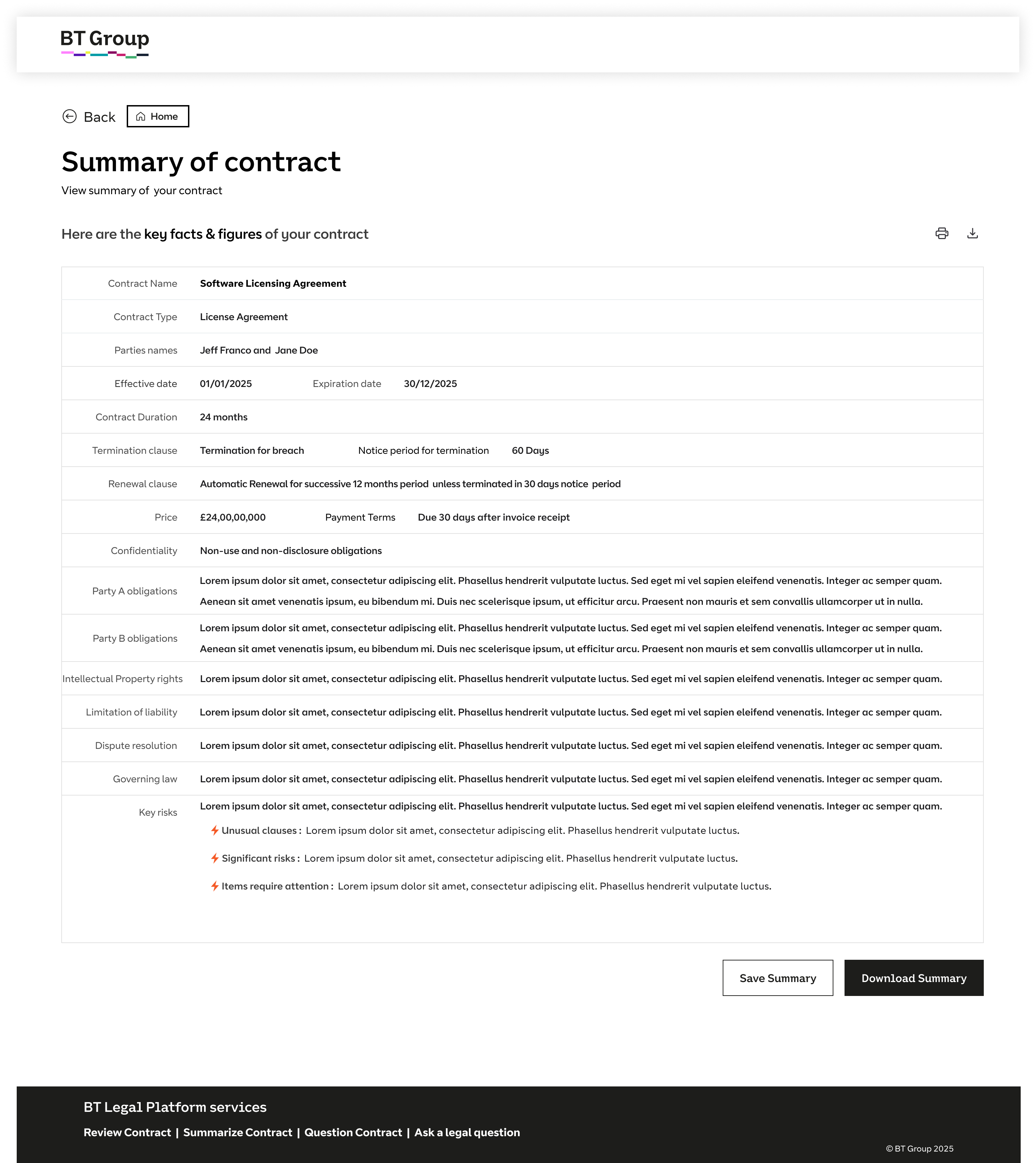
Core UX Principle

Instant Clarity

Pain Point

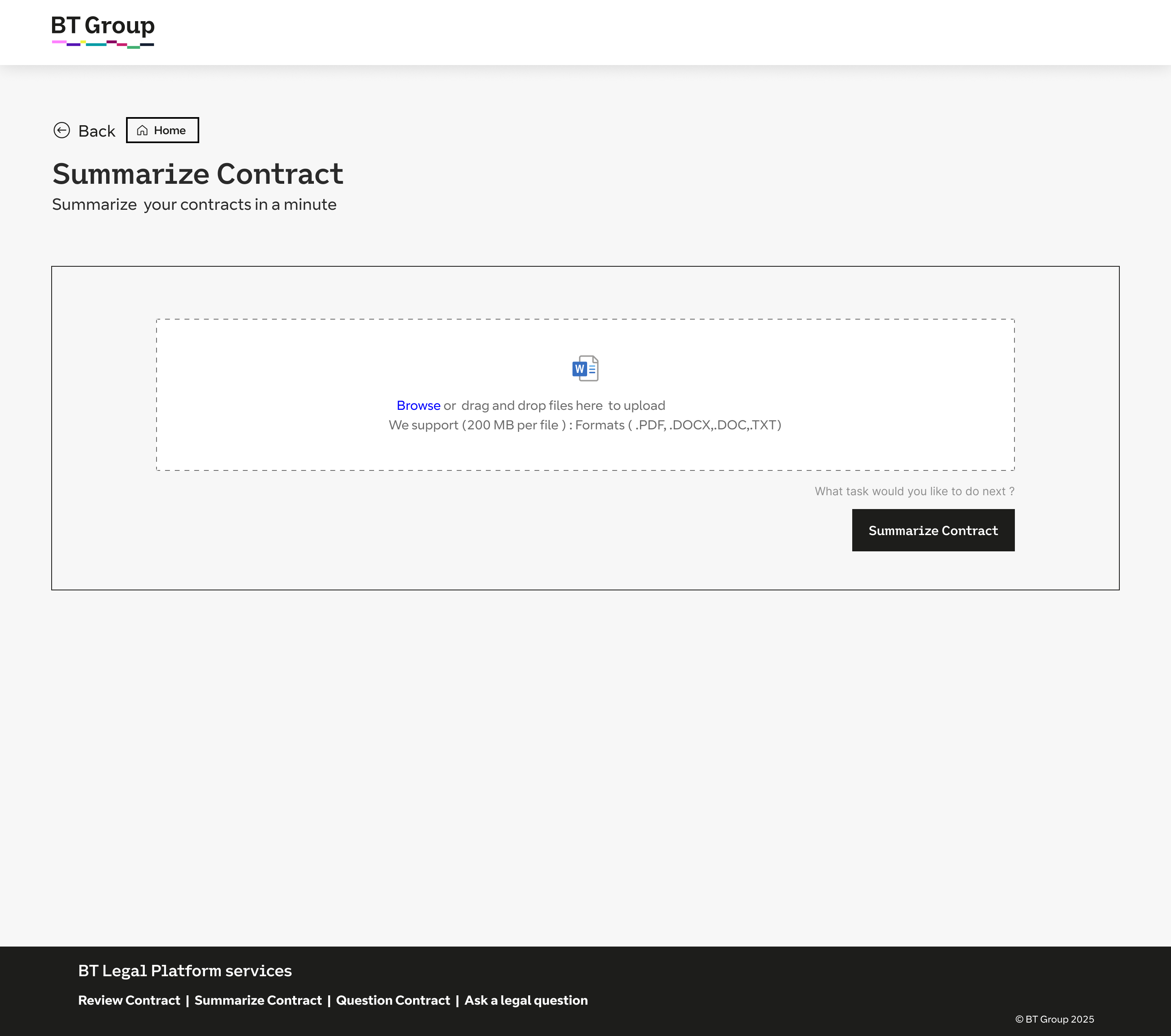
Generate contract summary after upload with save, download, print options →

Design Solution
Auto-generated summaries with save, print, and download actions.
Instant AI Summary Generation

Automatically generate a concise, structured summary including key obligations, risks, and important dates.

Flexible Output Options

Enable users to save summaries within the platform or export them as downloadable/printable formats (PDF, Word).

Pain Point

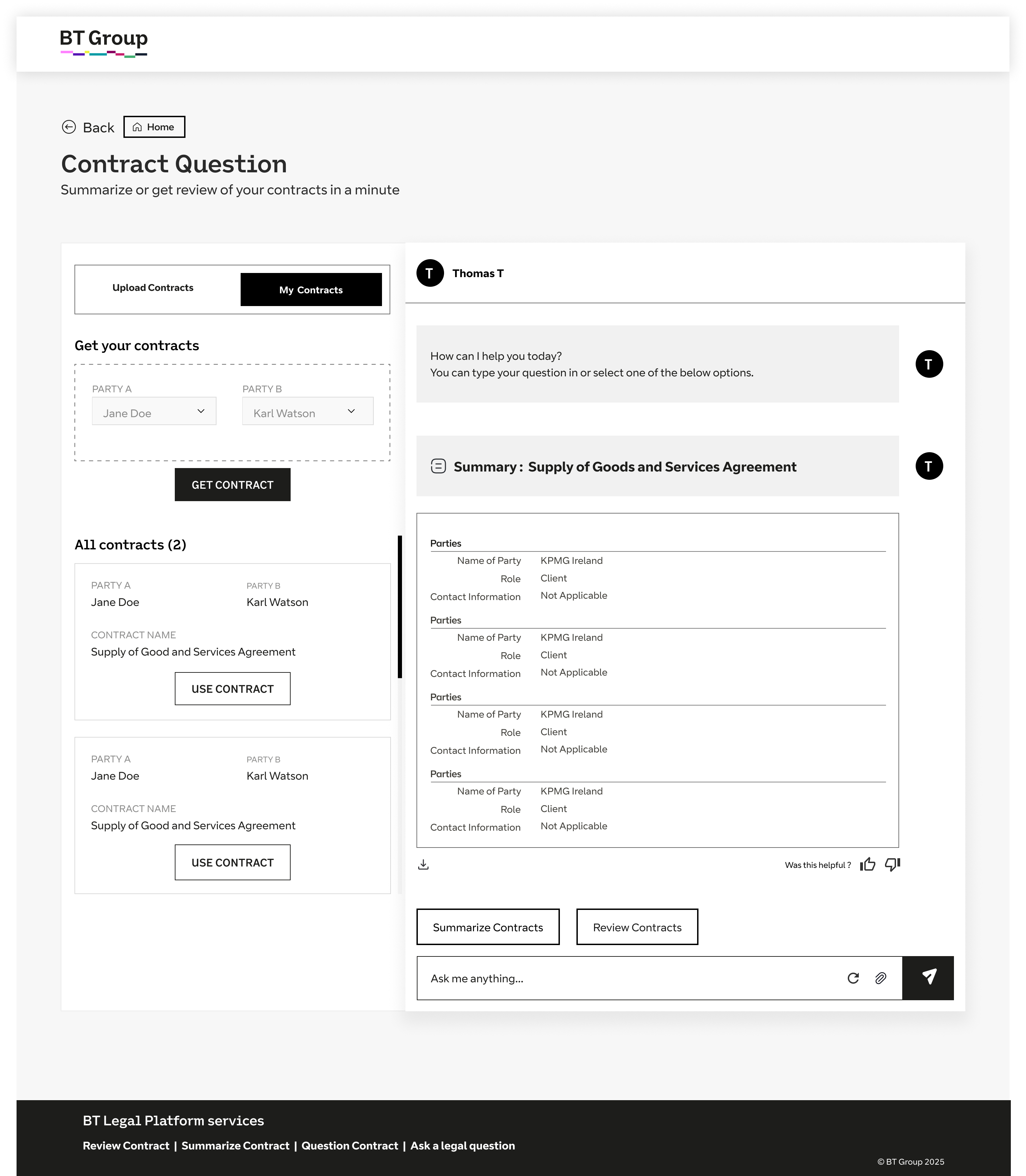
View all contracts between two parties with AI summarize and review →

Design Solution
Unified contract timeline with AI-powered summaries.
Centralized Contract Repository

Provide a filtered view of all contracts between selected parties for easy tracking and audit readiness.

Batch AI Review & Comparison

Allow users to summarize and compare multiple contracts simultaneously to identify inconsistencies or risks.

AI Proposal Workspace

Core UX Principle

Context First

AI Proposal Workspace

Core UX Principle

System Transparency

Pain Point

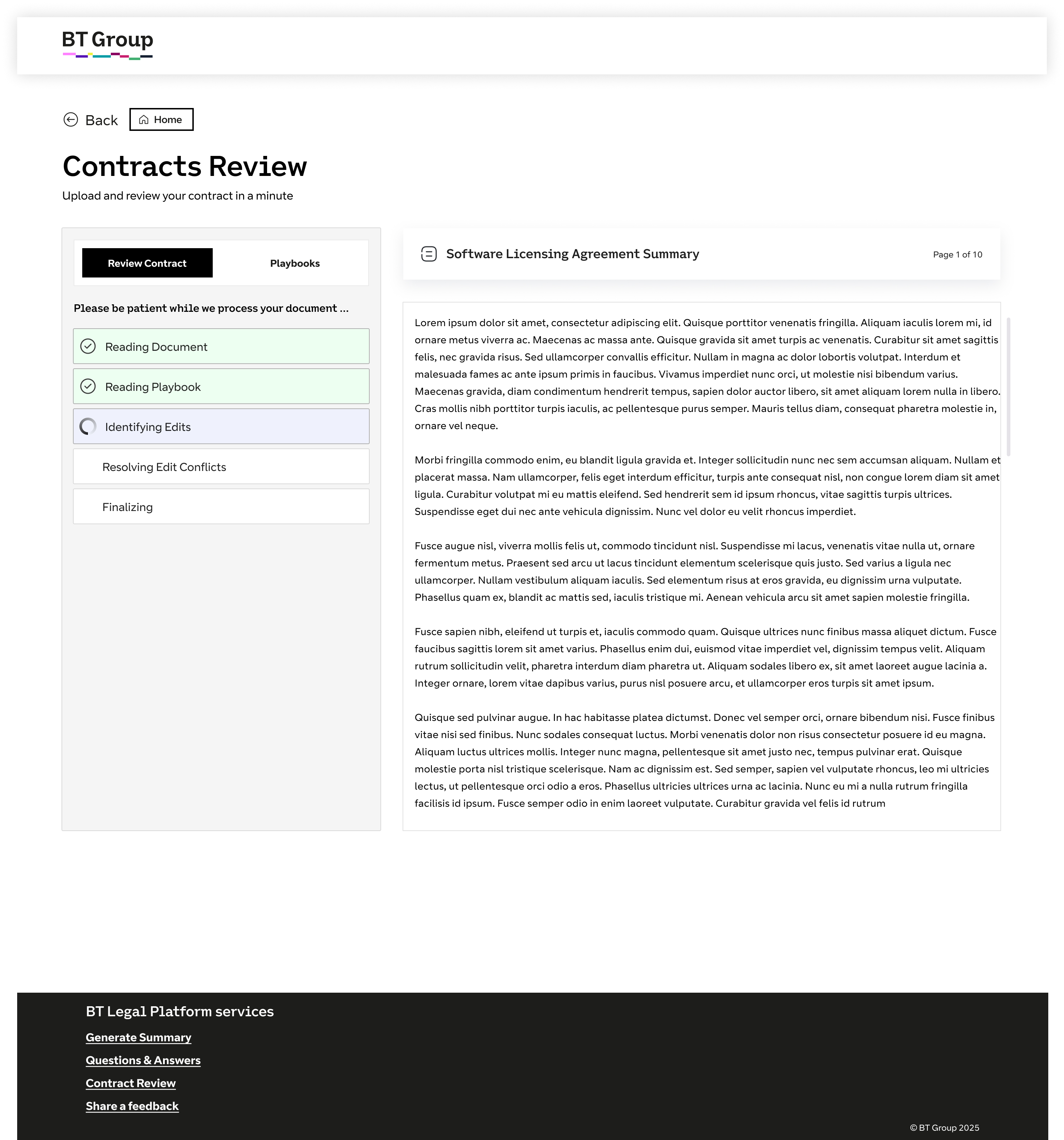
Uploaded contracts processed automatically in review section with relevant playbook visibility →

Design Solution
Centralized review dashboard with status tracking and linked playbooks.
Automated Processing Pipeline

Contracts are indexed, parsed, and analyzed automatically after upload, making them ready for review without manual intervention

Playbook-linked Review Interface

Display relevant playbook rules alongside contract clauses to support faster and more contextual review decisions.

Pain Point

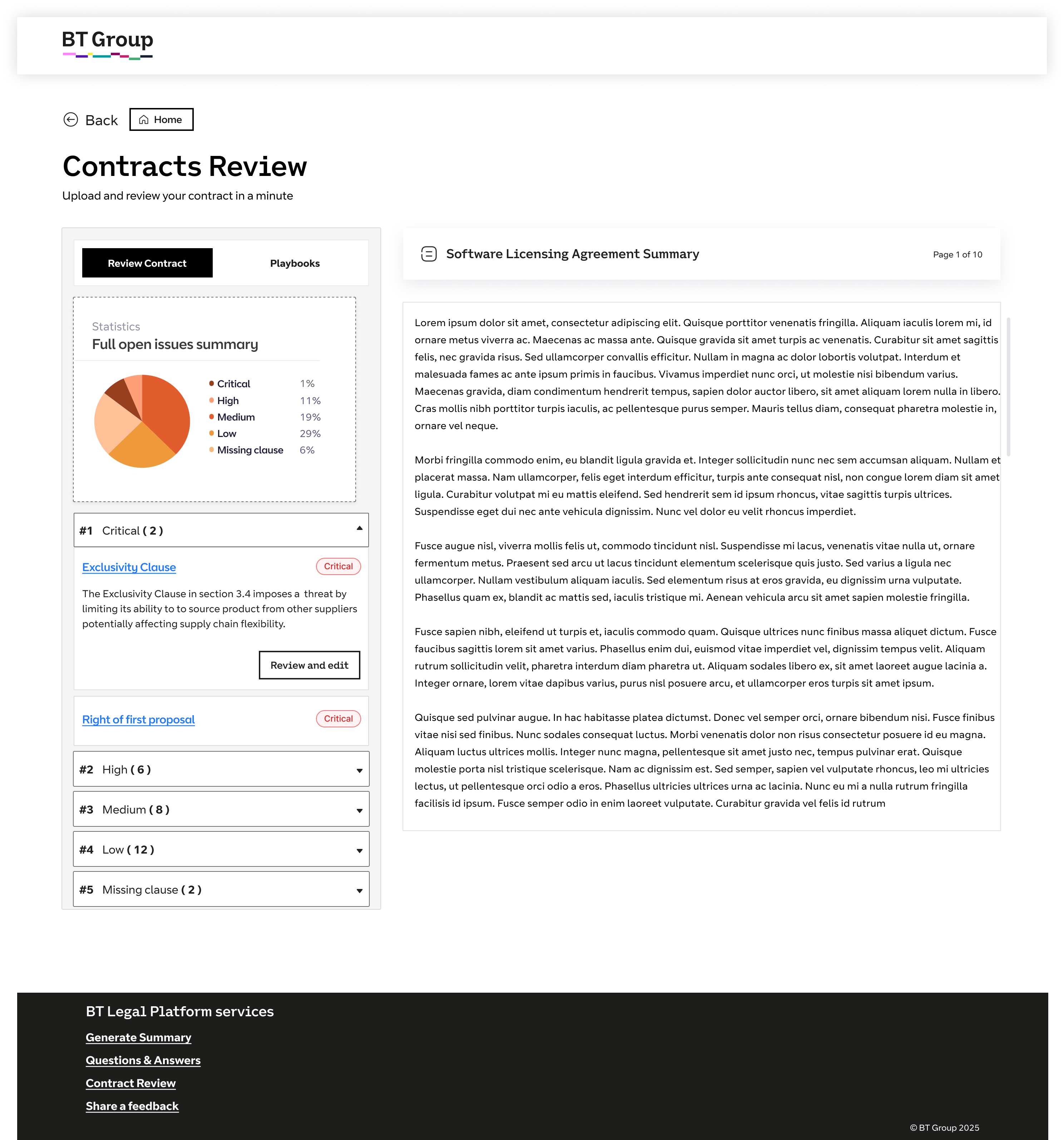
Analytics dashboard with clauses grouped by severity →

Design Solution
Severity-based analytics with visual risk grouping.
Centralized Contract Repository

Provide a filtered view of all contracts between selected parties for easy tracking and audit readiness.

Batch AI Review & Comparison

Allow users to summarize and compare multiple contracts simultaneously to identify inconsistencies or risks.

AI Proposal Workspace

Core UX Principle

Visual Prioritization

AI Proposal Workspace

Core UX Principle

Keep AI editable, explainable,and visible inside the workflow.

Pain Point

Clause Severity Analytics →

Design Solution
Severity-based analytics with visual risk grouping.
Risk-based Clause Classification

Critical risks get buried in dense legal text.

Interactive Analytics Dashboard

Display relevant playbook rules alongside contract clauses to support faster and more contextual review decisions.

Usability Testing & Iteration

Early versions looked good. Users still felt confused.

Early testing showed that users found the language too technical and the steps hard to follow, so the design had to be simplified.

First Attempt
Complex workflow

Testing Observation

Complex terms confused users

“Low Confidence Alert” “Risk Score” “Recommendation Level”

Users thought it looked smart, but it was hard to understand quickly while reviewing contracts.

User Confusion

High

Task Completion

Slow

Improved Version
Simplified workflow

Design Improvement

Simpler design made things clearer

01

Simple words replaced technical terms

Labels were changed to match how users normally read and review contracts.

02

Clear status made decisions easier

Simple High / Medium / Low labels helped users decide faster.

03

Quick actions improved speed

Accept, Edit, and Reject actions were easy to use right away.

Result After Changes

Faster understanding & smoother reviews

Impact Overview

Measuring trust, speed & usage

Success wasn’t just about being accurate. It was about how easily teams could complete their work, feel confident about it, and get things done faster.

Task Completion

+42%

Teams were able to complete their work much faster after the workflow became simpler and easier to follow.

Time to Finish

-58%

Approvals and reviews were completed much faster, helping teams move work forward quickly.

Usage Growth

As trust improved, more teams started using it regularly

After launch improvements
Week 1 Week 4 Week 8 Week 12

Confidence

High

Usage

78%

Manual Work

Reduced

``
Key Learnings

Good design isn’t about showing more information. It’s about making things clear and easy to understand.

01

Clear design builds trust

Users trust what they understand. When things are simple and easy to follow, people feel more confident in their decisions.

02

Simplicity makes work easier

The best experiences are not the most complex ones. They are the ones that help users think less and decide faster.

03

Users need to stay in control

People are more comfortable when they can review, change, and approve things themselves. It helps them feel in control of their work.

Leave a Reply

Your email address will not be published. Required fields are marked *