Problem Statement
Enterprise users were overwhelmed by complex data and AI outputs that were technically powerful but difficult to trust and act upon.
DESIGN GOALS
✅ Make AI insights interpretable and actionable✅ Reduce cognitive load.
✅ Improve trust and adoption.
✅ Align AI outputs with real workflows.
Identify Pain Points
- Enterprise users spent 30% time creating documents, but automation introduced risks of incorrect or non-compliant content
- 90% of business documents contain manual errors (Gartner).
- Inefficiencies cost $19,732 per employee per year (IDC).
- Branding & compliance inconsistencies weaken trust.
Solution: AI Document Generator
✅ Automates creation of reports, contracts, proposals, and summaries✅ 50–70% faster document creation.
✅ 20–40% productivity gains across teams.
✅ Consistent, error-free, and scalable document generation.
✅ The challenge wasn’t generating content — it was designing trust, review, and accountability into the workflow
Why AI (and why NOT full automation)
WHAT AI IS GOOD AT
AI was well-suited to assist with early drafting by synthesizing inputs, suggesting structured content, and reducing repetitive writing effort.
Why FULL automation was not acceptable
However, fully automated document generation posed significant risks. AI-generated content could be inaccurate, incomplete, or misaligned with organizational standards, creating legal, compliance, and trust issues.
We intentionally avoided a ‘one-click generate’ experience. Instead, we designed AI as a drafting assistant, keeping users responsible for review and final approval
WHERE AI STOPPED
AI was used to generate an initial draft based on user inputs, but users retained full control to review, edit, regenerate, or discard content before finalizing the document..
UX IMPLICATIONS
This decision directly influenced the UX, requiring clear visual distinction between AI-generated and user-edited content, granular edit controls, and explicit confirmation before final output.
Design Process
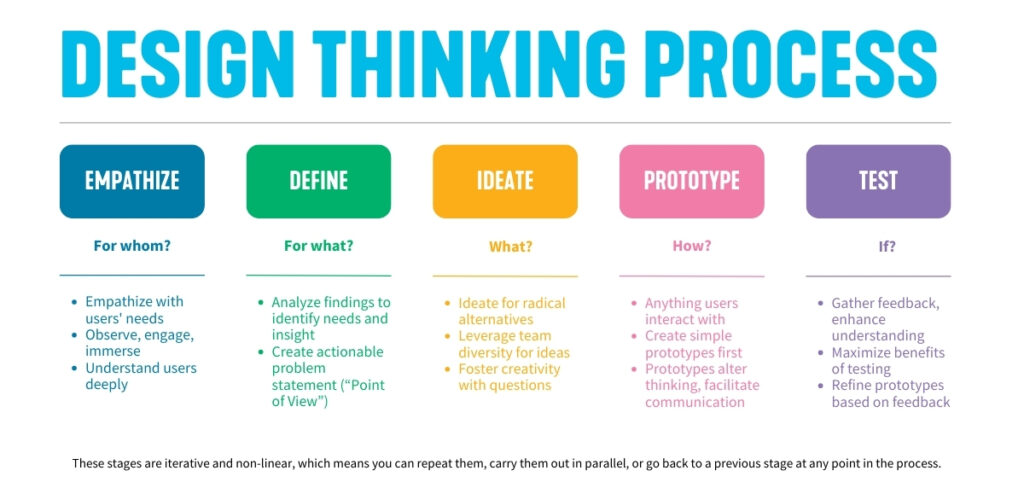
01 / Empathize – Understand users
📊 User Interview – Key Statistics & Findings
I collaborated with stakeholders and conducted:
- User interviews with domain experts
- Workflow analysis of existing decision-making processes
- Review of AI model constraints and failure cases
KEY INSIGHT
Users didn’t want “smarter AI” — they wanted clear confidence signals, transparency, and control over decisions
77.1% say they use AI in at least some of their work.
45.5% use AI to help with writing reports. i.e. almost half are using AI document-generation / writing assistance.
47.8% use AI for transcription; 40.8% use AI for note-taking.
The biggest benefit cited is efficiency, while the biggest concern is inaccurate or incomplete analysis.
🧠 What Users Say (Positive & Negative)
Challenges / Concerns
- Accuracy: AI sometimes mis-interprets input
- Trust & credibility: Users worry about bias, about content being misleading
- Privacy: worries about how much data is disclosed
- Designing for uncertainty and confidence levels
- Preventing blind trust or total rejection of AI outputs
Quotes
“It was 80% me, 20% AI.”
“We don’t want AI taking over; we want it to amplify what we already bring to the table.”
02 / Define – User’s Needs and Problems

👤 Rahul Chopra
Occupation
Project Manager at a mid-sized consulting firm
Demographics
- 34 years old;
- Lives in Delhi;
- IIM from Madras
- Work Environment: Hybrid (office + remote)
- Tech Comfort High (familiar with SaaS tools, AI assistants, and collaboration platforms)
- Has an upper-middle-income level
Motivations 🏅
────୨ৎ────High-quality outputs efficiently Boost productivity easily. Appear professional and reliable to clients
Goals and Needs 🎯
────୨ৎ────
Deliver client-ready documents (proposals, reports, meeting summaries) quickly and accurately.
Ensure consistency in branding, tone, and formatting across all project deliverables.
Reduce time wasted on repetitive documentation so he can focus on strategy and client relationships.
Pain Points🤔
────୨ৎ────
- Spends 6–8 hours/week manually drafting and formatting reports
- Frustrated by errors and inconsistencies
- Under pressure to deliver last-minute documents with little review time.
- difficult to scale personalized documents
🤖 How the AI Agent Helps
Time Saving – Error Reduction – Scalability – Confidence
03 / Ideation
how might we (hmw questions)
How might we personalize outputs without input from users?
How might we ensure accuracy and compliance automatically?.
How might we reduce time spent formatting documents?.
Crazy 8s (Rapid Sketching)… sketches 8 different ideas in 8 minutes
04 / ✨ Design Strategy
Aligned AI insights directly with existing user workflows
Introduced confidence indicators and rationale summaries for AI outputs.
Designed progressive disclosure to reveal AI logic.
05 / Prototype
06 / User Testing
I have designed user testing to evaluate how effectively and efficiently real users can perform their tasks using the AI agent compared to manual review.
🙍♂️ Participants
- 6 Business Analysts
- 5 Administrative Staff
- 4 Software Developers
📝 Tasks to complete using AI
- Generate a professional invoice from a template
- Customize a report using the document builder
- Export documents in PDF, DOCX, and Markdown formats
- Use AI-assisted content generation to populate sections
📶 Statistics to analyze AI
- Success rate
- User satisfaction
- Average generation time
- Ease of use (SUS score)
🎢 Quick Insights
- Document export is fast and reliable
- Love the AI suggestions—it saves time
- AI sometimes adds irrelevant content
Issues & Recommendation
🚩 Cluttered customization interface
Redesign panel layout with collapsible sections
🚩 Irrelevant AI content
Improve prompt alignment and allow content refinement
🚩 Learning curve for new users
Add onboarding tutorial or tooltip system
The application performed well in speed, reliability, and general user satisfaction. However, improvements in AI content accuracy and interface clarity would further enhance usability.
Leave a Reply