|

AI CASE STUDY

You just got a 78-page RFP.
Deadline: 48 hours

Monday, 9:42 AM

You open the document.

Scroll… Scroll… Scroll…

Half the answers already exist somewhere inside company. User just don’t know where.

❌ Today
  • Days of writing
  • Endless copy-paste
  • Constant expert follow-ups
✅ With AI Agent
  • Draft in minutes
  • Auto-filled responses
  • Ready for review
Role: Product Designer Duration: 6 weeks Type: AI Product

0

Time Reduction

3x

Faster Drafting

Expert Dependency

The challenge was not generating documents.
The challenge was helping users trust and validate AI-generated content
while reducing document creation time


CORE PROBLEM

Creating Business Documents Takes More Time Than It Should

Teams spent more time searching through previous proposals, Slack threads, PDFs, and expert feedback than actually writing responses. The information already existed — it was simply fragmented across the organization.

Hours Lost Searching

Proposal teams manually searched through old RFPs, internal folders, and scattered documentation to reconstruct answers.

🤝

Expert Dependency

Subject matter experts repeatedly answered similar questions, creating bottlenecks and slowing proposal turnaround time.

⚠️

Accuracy & Consistency

RFP responses involved compliance, business nuance, and contextual accuracy — making blind automation risky.

WHAT WE HEARD FROM USERS

Every review starts from scratch.
Information exists, but finding it is painful.
I spend more time looking for previous versions than creating the new document.

Why AI | Why couldn't traditional software solve this: AI Opportunity Map

Traditional tools could store knowledge. They couldn't turn it into a document.

Traditional workflow
🔍

Search multiple systems

📄

Compare old documents

Validate information

✍️

Create document manually

AI Opportunity

Automate repetitive work

AI-assisted workflow
💡

Understand user intent

🧠

Retrieve relevant knowledge

Generate first draft instantly

👤

Keep users in control

Key Insight

We didn't use AI to replace document creators. We used AI to reduce the time spent searching, organizing, and drafting information.

Human + AI workflow

AI accelerates the process. Humans stay in control.

AI handles retrieval and drafting while users review, refine, and approve the final document.

👤
Human

Define intent

User describes the document they want to create.

AI

Retrieve knowledge

Finds relevant content from organizational sources.

AI

Generate draft

Creates a structured first draft in seconds.

Human

Review & refine

User validates information and edits content.

🚀
Human

Approve & publish

Final document is approved and shared.

AI drafts the document. Humans own the final decision.

Key Design Decisions

Design Decision 01

Let AI handle the first draft

Instead of starting with a blank page, AI prepares the first draft so users can focus on refining it.

Design Decision 02

Build on what already exists

AI uses trusted company documents and past work instead of creating content from scratch.

Design Decision 03

Help users trust the output

AI shows where the information came from, making it easier for users to verify and edit the content.

⭐ Key Decision

Keep users in control

Every document goes through human review before it's shared. AI helps with the work, but people make the final call.

Design Principle

AI assists. Humans decide.

AI Case Study

Designing workflows that help people get work done faster.

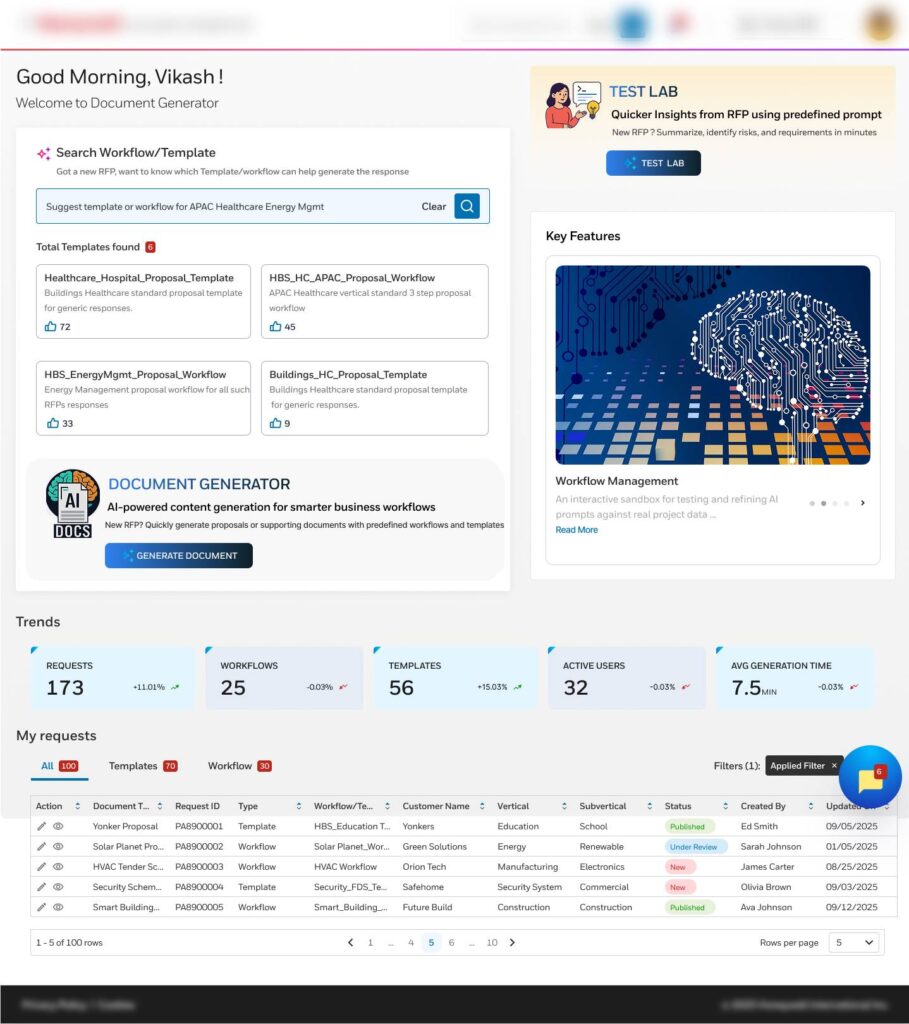
Pain Point

Users feel lost about where to start and what step comes next →

Design Solution
Guided dashboard showing clear start points, steps, and live status
AI-Powered Document Generation

Generate structured documents automatically using AI-driven prompts and templates.

Search Workflow and Templates

Configure and manage reusable search workflows and document templates.

RFP Search Using Predefined Prompts

Quickly find relevant RFPs using standardized, ready-to-use AI prompts.
AI Proposal Workspace

Core UX Principle

Keep AI editable, explainable, and visible inside the workflow.
AI Proposal Workspace

Core UX Principle

Keep AI editable, explainable,and visible inside the workflow.

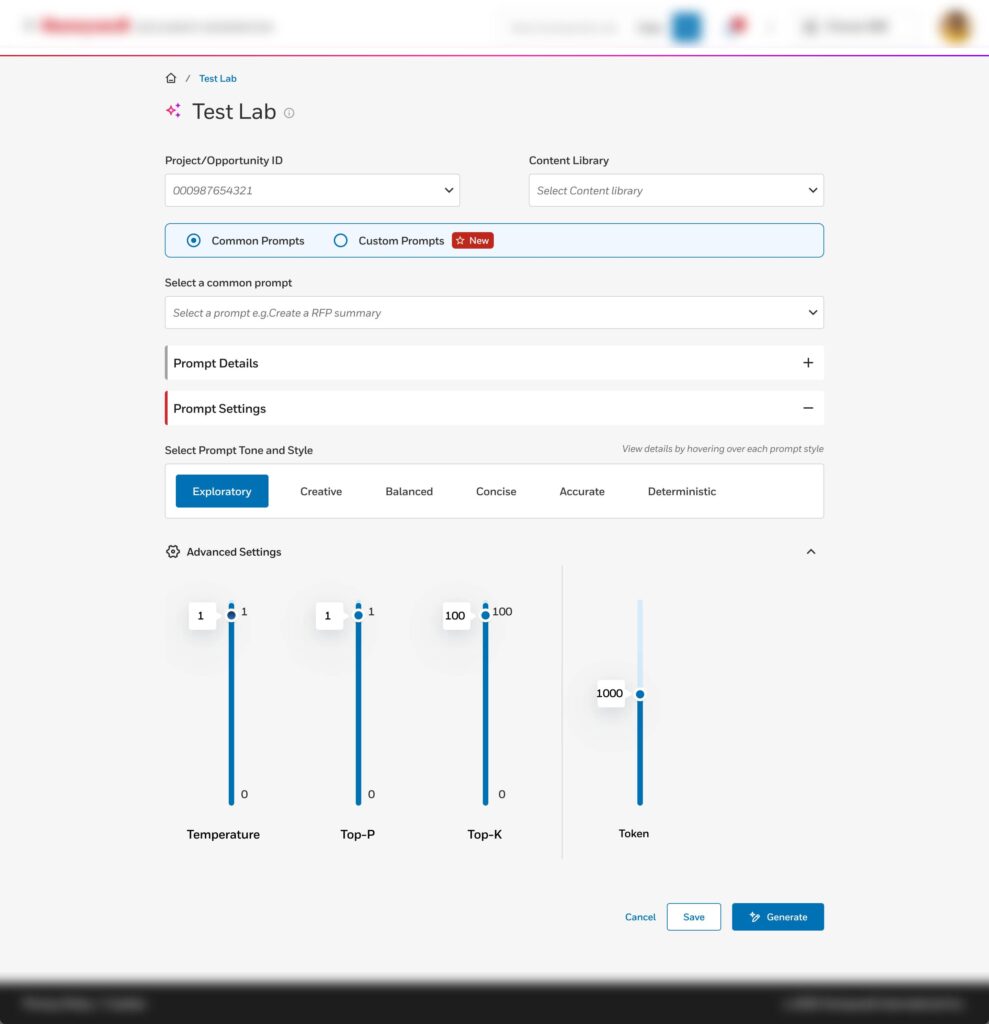
Pain Point

Users find it hard to get the right results and often rely on trial and error →

Design Solution
Safe sandbox to test, compare, and refine prompts with instant feedback.
Create Predefined Prompts

Design reusable prompts to ensure consistent and efficient content generation.

Prompt Details & Configuration

Define prompt behavior, scope, and parameters for accurate AI outputs.

Advanced Prompt Configuration

Fine-tune AI responses using advanced rules and control settings.

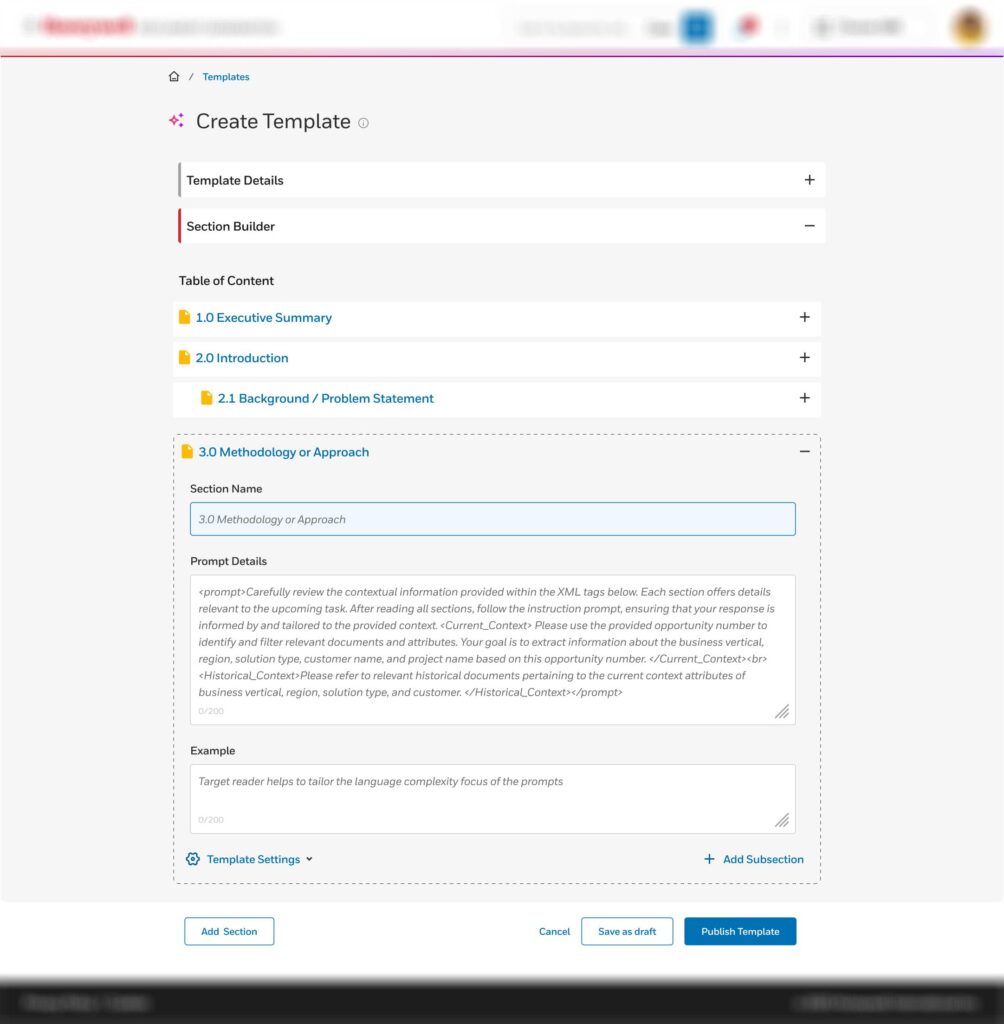
Pain Point

Users waste time searching for or recreating document formats and sections from scratch. →

Design Solution
Centralized, versioned template library with predefined, reusable sections.
Template Creation

Build structured templates to standardize document generation

Template Details Setup

Configure metadata, naming, and ownership details for templates

Add Sections to Template

Dynamically create and customize sections within a template

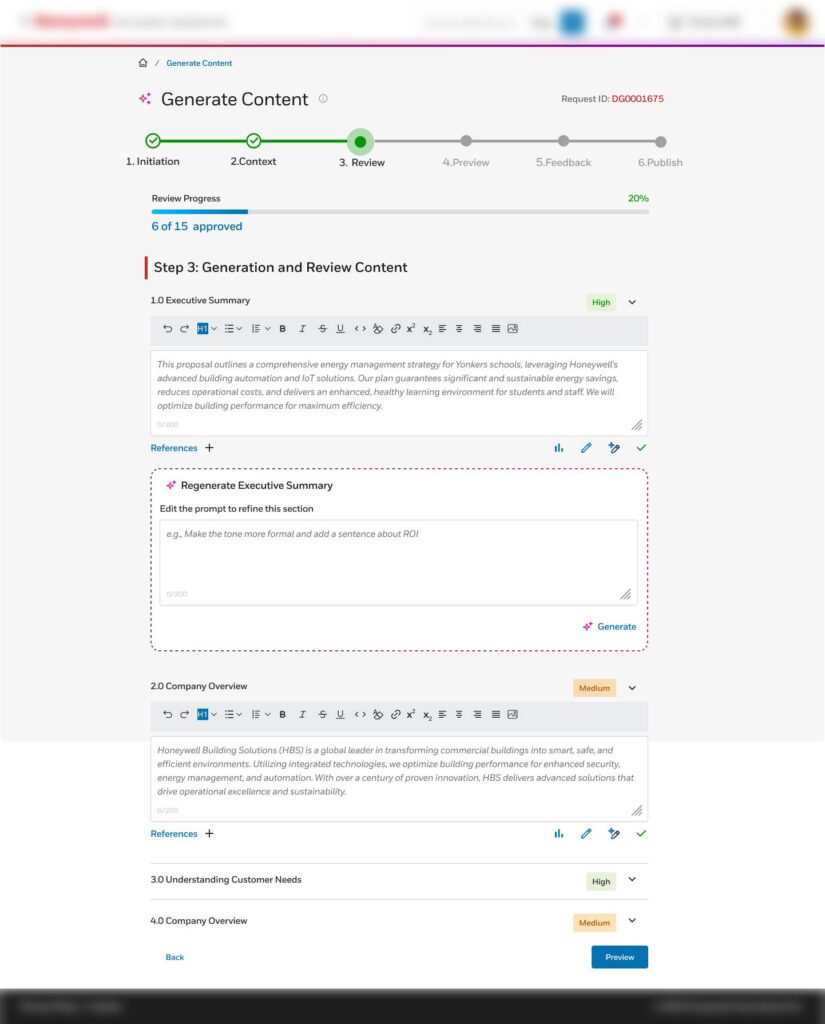
AI Proposal Workspace

Core UX Principle

Keep AI editable, explainable, and visible inside the workflow.
AI Proposal Workspace

Core UX Principle

Keep AI editable, explainable,and visible inside the workflow.

Pain Point

Users feel they are losing control, worry about access and permissions, and see inconsistent results →

Design Solution
Role-based permissions with configurable generation rules and edit controls.
Template Configuration & Rules

Control template behavior, permissions, and generation logic

AI Content Generation

Generate high-quality content automatically using AI models

Confidence Score Assignment

Assign AI-generated confidence levels to validate output reliability

Workflow Transformation with Design

Cut down on repetitive proposal work by making the process smarter and more streamlined

Before

Manual, scattered process

Sales Team
SMEs
Drafting
Review
Submit

After

Simple, guided workflow

Sales Team
AI Agent
Review
Submit

Trust & Safety

Building confidence into every AI interaction

The goal was not to generate documents faster, it was to make users confident enough to use them.

Incorrect AI output

AI may generate inaccurate information.

Human review

Every draft is reviewed and editable before publishing.

Higher confidence

Users stay in control of the final document.

Missing context

AI may overlook business-specific details.

Organizational knowledge

Responses are grounded in trusted company documents.

More relevant drafts

Better alignment with business standards.

Blind trust

Users may accept AI output without checking it.

Source references

Users can verify where the information came from.

Greater transparency

Easier to trust and validate AI suggestions.

Validation

We tested early and refined continuously

User feedback helped us improve trust, clarity, and usability before launch.

What we tested

AI-generated draft

Can users understand, edit, and trust the generated document?

💬
What changed

Added human review

Users wanted control before sharing the document.

What we tested

AI suggestions

Do users know where AI content comes from?

🔄
What changed

Added source references

Users could verify information before accepting it.

What we tested

End-to-end workflow

Could users complete document creation with confidence?

What changed

Simplified the workflow

Reduced unnecessary steps and made actions clearer.

Impact & Learnings

Success wasn’t about how much AI we built. It was about whether people actually used it and trusted it.

User Impact

60%

Faster proposal drafting

  • ✓ Less searching for information
  • ✓ Faster first drafts
  • ✓ Higher confidence before submission
  • ✓ Reduced repetitive work
Business Impact

Improved knowledge reuse

  • ✓ Better proposal consistency
  • ✓ Lower SME dependency
  • ✓ Faster RFP turnaround
  • ✓ Higher team productivity

⭐ North Star Outcome

Teams spend less time searching for information and more time focusing on creating better proposals.

Success Metrics

Draft time ↓ 60%
AI adoption
Knowledge reuse
User confidence

What I'd improve next

Personalize AI

Learn from user edits and writing style.

Smarter retrieval

Improve semantic search for better answers.

Continuous learning

Improve AI using user feedback.

```

Leave a Reply

Your email address will not be published. Required fields are marked *